Every association hits the same week each year. The banquet is done, next year's registration is open, and somebody has to answer the awkward question: what happens to last season? Do the teams carry over? Do the stats reset? Where did the summer league go? For most organizations that week involves a spreadsheet and a fair amount of hope.
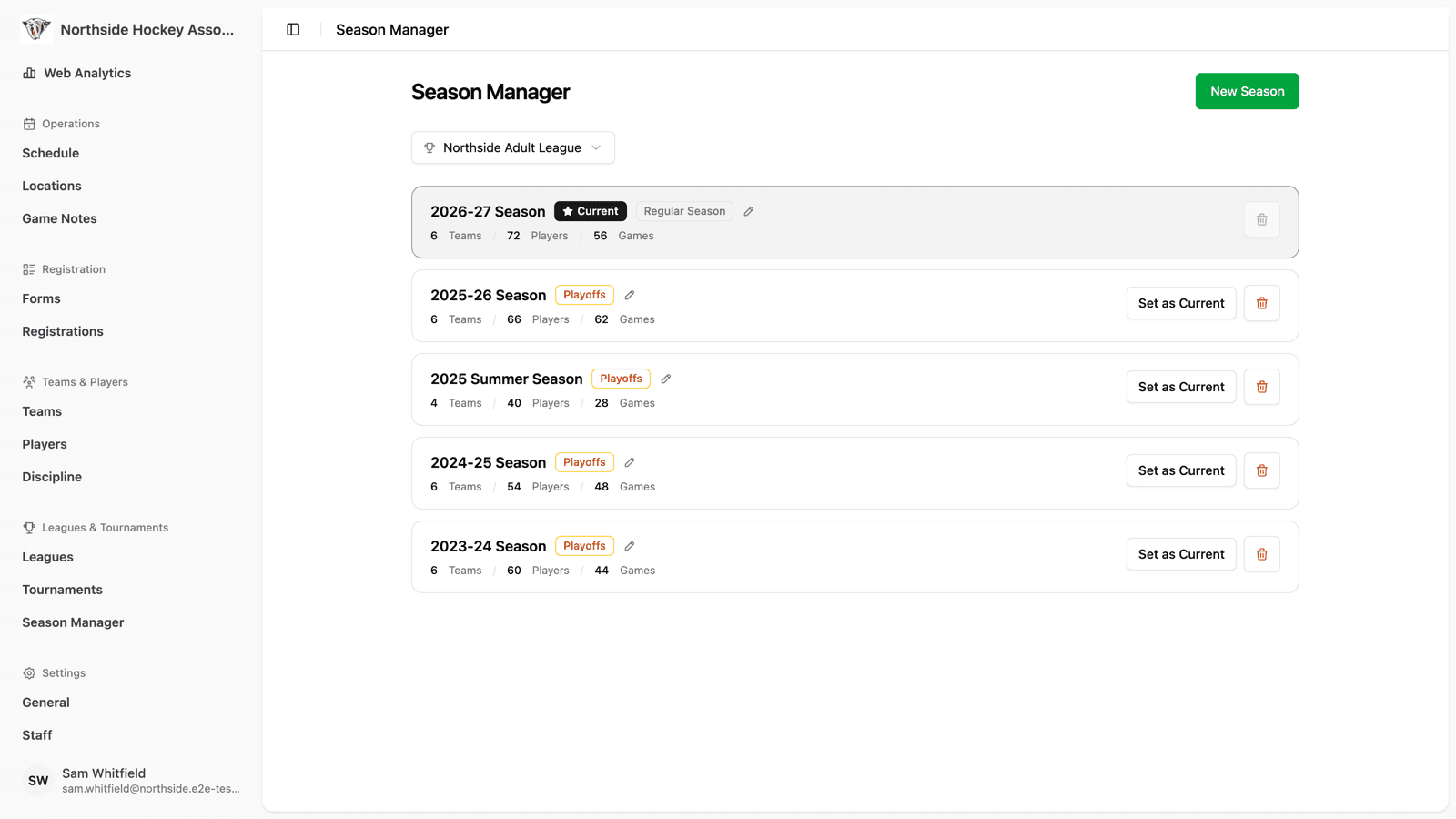
The new Season Manager in your association dashboard replaces that week with one screen. Pick a league or tournament, and you see every season it has ever had, which one is live, what each one contains, and every action you can take on it—in one place.
Every Season, With Its Contents Visible
Each season is listed with its name, whether it's in Regular Season or Playoffs, which one is marked Current, and—this is the part admins tell us they've always wanted—how much is actually in it: the number of teams, the number of players, and the number of games.
Those counts turn a list of names into something you can reason about. A season with 8 teams, 112 players, and 168 games is your real season. A season with 2 teams and 0 games is the one somebody created by accident last October and everyone has been scrolling past ever since.
Rolling Into a New Season, With the Parts You Choose
Starting a new season is a single dialog. Name it—2026-27 Season, Summer Split, whatever your league calls it— and decide what carries forward:
- Keep teams — carry the same clubs into the new season with their names, colours, and logos intact.
- Keep players — bring rosters across instead of re-entering everyone.
- Keep subs — hold on to your list of spares, which is usually the hardest thing to rebuild from scratch.
- Unassign all players from teams — keep the player pool but clear the rosters, which is exactly what you want when a draft or tryouts are about to decide who plays where.
HockeySync confirms before it acts, naming the season it's about to archive and the one it's about to activate, so a rollover is never something that happens because of a stray click. Statistics stay attached to the season they were earned in—a new season starts genuinely at zero, and last year's numbers stay exactly as they were.
Choosing Which Season Is Current
The current season is what your public league page, standings, and schedule show by default. In the Season Manager, changing it is one click: Set as Current.
That's more useful than it sounds. If you rolled over a week too early, you can point the league back at the season that's still being played. If you run a summer league alongside a winter one, you decide which one greets visitors. And when you're ready, one click puts the new season front and centre for everyone.
Fans and players are never stranded on a season you're not featuring—the season switcher still lets anyone browse your full history. The Season Manager decides the default; the switcher lets people go anywhere.
Regular Season and Playoffs Are a Switch, Not a Migration
When the regular season ends, flip the season's status to Playoffs. You don't create a parallel season, duplicate your teams, or move anything. Regular season and playoff statistics are tracked separately, so a team's playoff run doesn't get averaged into eighty games of regular season play, and vice versa.
Renaming works the same way—edit a season's name in place when “2026 Season” should really have been “2026 Spring Season”. The games, stats, and standings underneath it don't move.
Deleting a Season Shows You the Bill First
Deleting a season is the most dangerous button in any league management tool, so it behaves accordingly. Before you confirm, HockeySync tells you exactly what would go with it: games, game events, teams, team staff, divisions, player seasons, announcements, and suspensions—counted, not described.
Two things are simply not allowed. You can't delete the current season—set a different one as current first, which forces a deliberate decision about where the league lands afterwards. And you can't delete a league's only season, since a league without a season isn't a thing that can exist.
Everything else is up to you, with the numbers in front of you. Test seasons and duplicates go away cleanly; real history takes a very deliberate confirmation.
Built for Associations Running More Than One League
The Season Manager lives in the association dashboard and starts with a league or tournament picker, because organizations rarely have just one. A multi-division association can move through every league's rollover from a single screen instead of opening each league dashboard in its own tab and trying to remember which ones are done.
It's also one of the first screens built with HockeySync's spotlight treatment—the dark, scoreboard-inspired look we reserve for flagship management views. Season rollover is the highest-stakes thing an admin does all year. It should look like it matters.
Available Now
The Season Manager is live for every HockeySync association. Open your association dashboard, choose Season Manager in the sidebar, and pick a league to see its full history.
Not using HockeySync yet? Sign up free and make next season's rollover a five-minute job.