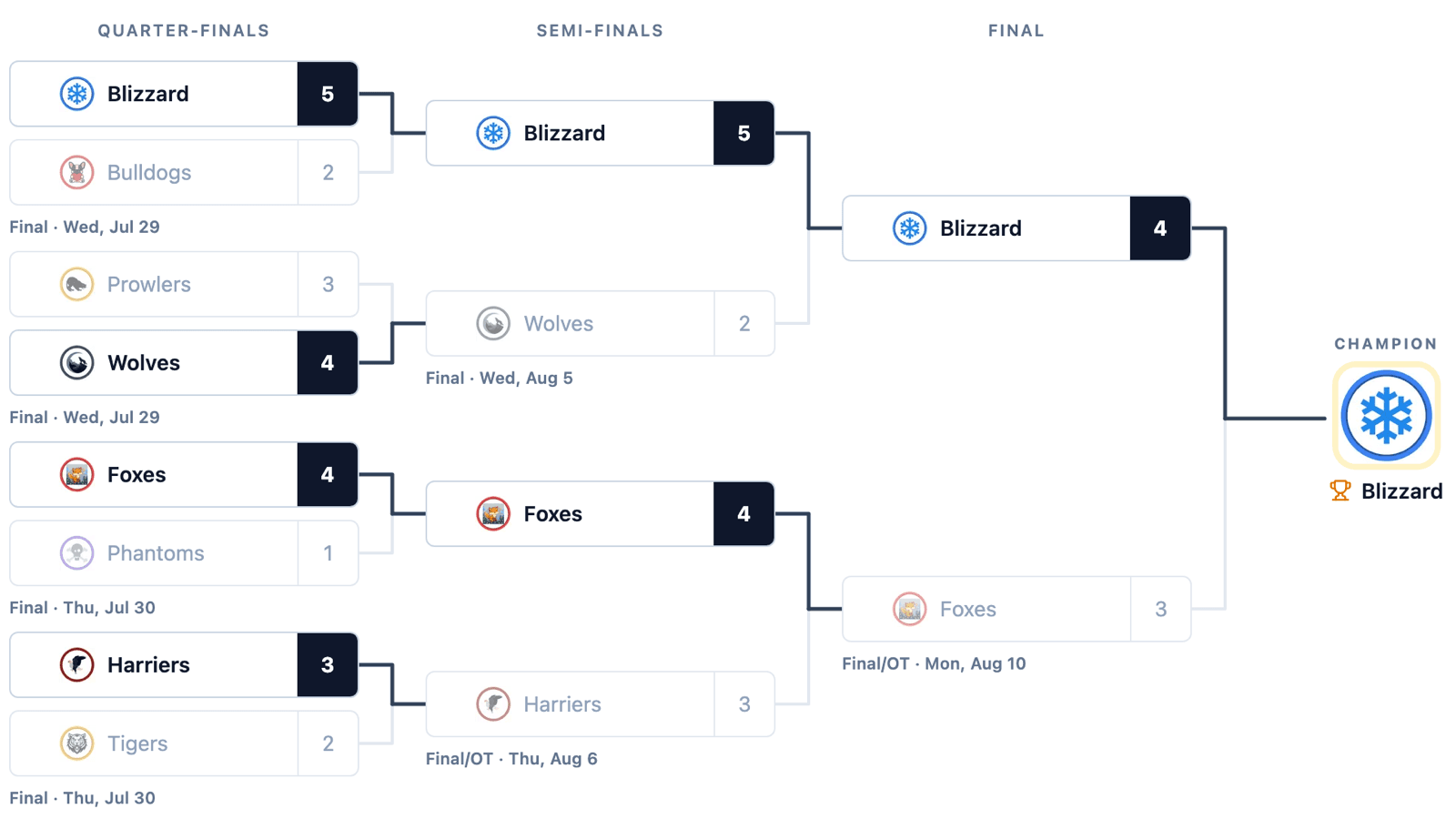
It's 11:40 on a Sunday night and the semi-final just ended in overtime. The scorekeeper has submitted the game sheet, the stats are in, and the league's bracket still shows last week. Somebody has to open it, type in a 4 and a 3, find the final's empty spot and type the winner's name again. Until they do, every parent refreshing the bracket sees a playoff that stopped on Thursday.
The rebuilt playoff bracket takes that job away. Each matchup can now hold the real games from your schedule. Place them once, and the teams, scores, series count and winner all come from those games—and the winner moves into the next round on their own. Editing happens on the bracket itself, and the bracket was redrawn so it reads properly on a phone.
Link a Matchup to Its Games
In the editor, every matchup has Add a scheduled game. It lists the season's playoff games that aren't already placed somewhere else in the bracket, by date and teams. Pick one and the matchup is linked. Pick several and it's a series.
From then on, the games decide what the bracket shows:
- Teams, logos and scores come from the linked game. A linked game's score always wins over anything typed by hand.
- The winner carries forward into the empty spot in the next round. Nobody retypes a team name.
- A game in progress shows a red dot on its score, and tapping a matchup opens its game.
None of this is copied into the bracket. It's worked out from the games every time the bracket loads, so if a score gets corrected after the fact, the bracket is corrected with it. There's no second place to fix.
Games only show up in the picker if they're marked as playoff games on the schedule. That's the one setting to check if the list comes up empty.
Series Length Per Round
Each round has its own series length: single game, best of 3, best of 5 or best of 7. Quarter-finals can be one game and the final a best of 7. The length shows in the round's header for everyone—“Final · Best of 7”—and in a series the score boxes count games won instead of goals. A team is through once it has won the majority.
Leagues Don't Always Follow the Tree
Real playoff formats get re-seeded, have crossover rounds, or give the top team a week off. So every spot can still be filled by hand when no game is linked:
- A league team, from a searchable list that shows seeds.
- A typed name, for a team that isn't in the league.
- A placeholder, like “Winner of game 65”.
- A bye, which sends the other team straight through.
A spot you filled by hand is never overwritten by a carried-forward winner. If you put a team there, it stays there.
Seeds show only when you set them—either with Generate from teams, which lays out the bracket from the season's standings, or in the seed box on each spot. HockeySync used to guess seeds for older brackets from the standings. Leagues seed in too many different ways for a guess to be right, so it doesn't anymore.
Edit It Where Fans See It
The separate bracket form is gone. League admins open the Bracket tab, tap Edit bracket, and every spot and round name becomes something to tap:
- A spot opens its matchup: the linked games, what each spot holds, seeds, and any scores entered by hand. It's a centred panel on a desktop and a bottom sheet on a phone.
- A round name opens the round: rename it, set its series length, add a matchup, or delete it.
- Add matchup sits at the end of each column, and Add round after the final.
Changes save as you make them, with a quiet status in the header and a Retry if a save fails. Removing a matchup or a round offers Undo, and deleting a whole bracket asks first. The rarer actions—rename, generate, clear scores, revert to the last save, delete—live in one menu. A season can have more than one bracket, each on its own tab.
On a phone, every spot is at least 44 pixels tall while you're editing, so it's a comfortable tap from the stands.
A Bracket You Can Read on a Phone
Most people check a bracket on their phone, so phones now get the bracket itself rather than a list of rounds. It swipes one round at a time and stops on the next round even after a hard flick. It opens on the round being played, with dots to show where you are and the round names pinned at the top.
The drawing was also rethought to make results obvious at a glance:
- The winner's path is drawn. Each winner's line is dark all the way through. Winners are bold, and losers fade.
- The score has its own cell, filled dark for the winner, so it can't be confused with the seed.
- An empty spot names both contenders once the game that feeds it is set—“FOX or TIG”—so fans know who they might see.
- Neutral colours. The bracket used to take the league's colour, and a red league made every matchup look like a loss. Now it's neutral, and team logos carry the colour.
Captions and a Champion
Every linked matchup gets a one-line caption worked out from its games, in the league's time zone:
- “Final · Wed, Jul 29” or “Final/OT” for a single game
- “PB win series 2–0” once a series is decided
- “Game 3 · 2nd · HCI leads 2–1” while a series game is live
- The date of the next game while a series is still going
Phones get shorter versions of the same captions. At the end of the bracket, the champion block shows the winner's logo with a gold ring and a trophy. Until the final is decided, it says when the final starts.
Where to Find It
Open your league and go to the Bracket tab. Fans see the bracket there. League admins see an Edit bracket button in the same place. A new bracket starts empty, with the choice to generate it from the season's teams or build it by hand.
To link games, mark them as playoff games on the schedule first. They'll then be listed under Add a scheduled game in each matchup.
Available Now
The rebuilt bracket is live for every HockeySync league, in English and in French. Existing brackets open in the new design as they are. Link games whenever you're ready, and hand-filled spots keep working in the meantime.
Not using HockeySync yet? Sign up free and let your playoff bracket keep itself up to date.