Something always happens that the gamesheet has no column for. A player showed up without a jersey number. The clock died in the second period. Two guys had words after the handshake. The visiting team dressed a goalie who isn't on the roster. Until now, that information travelled by text message to whoever the scorekeeper happened to have in their phone—if it travelled at all.
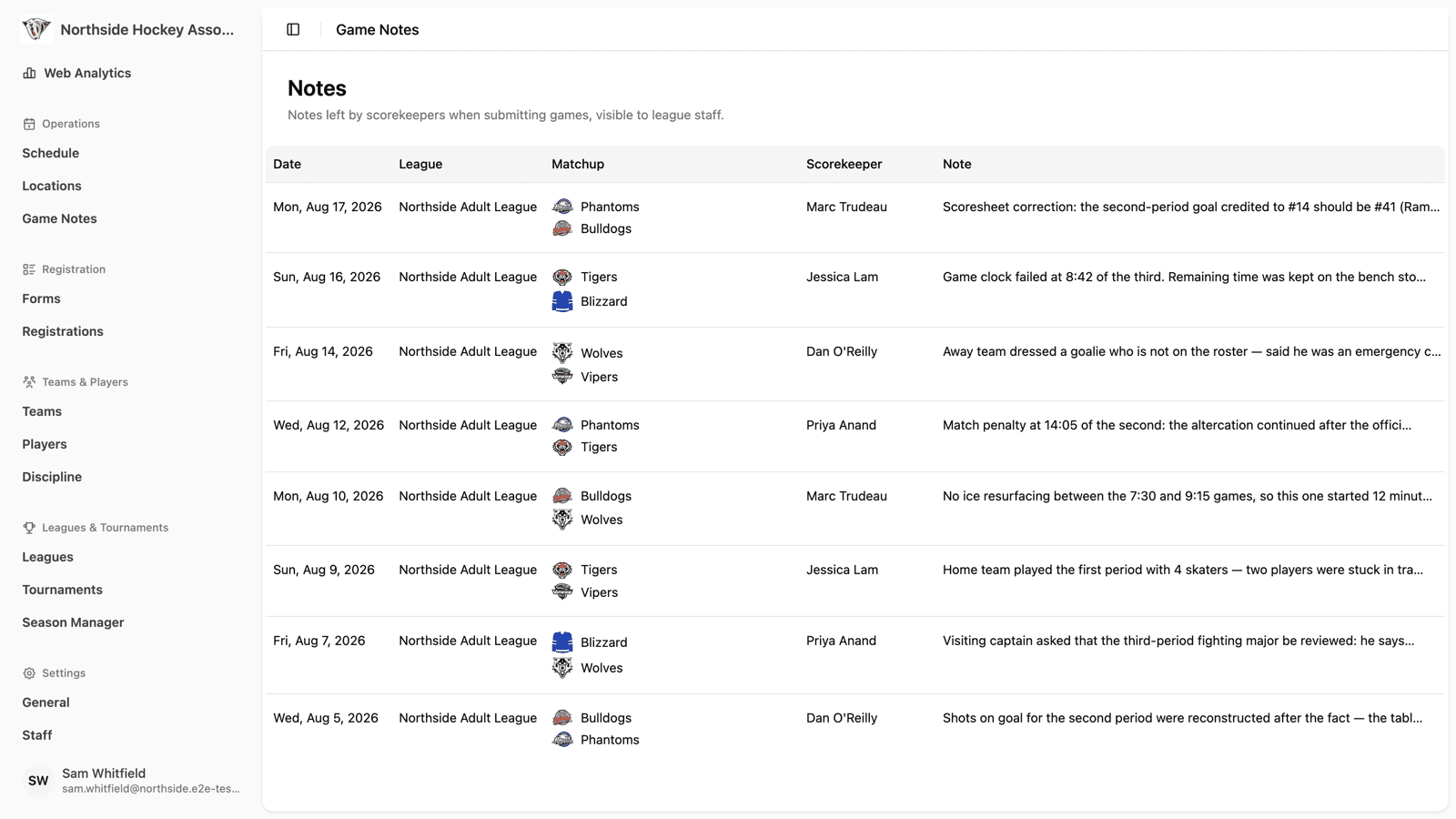
Game Notes gives that information a proper home. When a scorekeeper submits a game, they can attach a note for league and association staff. The note is saved with the game, the right people get an email about it, and every note your organization has ever received is collected on one screen in the association dashboard.
Writing a Note Takes Ten Seconds
The note field lives in the Save & Submit dialog at the end of a game—the screen your scorekeeper is already on. It's labelled Game Notes (visible to league staff), and it's optional. Most games won't need one.
When a game does need one, the scorekeeper types what happened—a scoresheet correction, an incident, an equipment problem, a roster question—and submits the game as usual. Nothing else about the workflow changes, and nothing gets held up waiting for a note.
Because the note is attached to the game itself, it arrives with all of its context already in place: which league, which date, which two teams, and which scorekeeper wrote it. Nobody has to reconstruct “which game was this about again?” three days later.
An Email the Moment It's Submitted
A note nobody reads is no better than a text message nobody answers. So when a game is submitted with a note, HockeySync emails it to your organization straight away—matchup, date, scorekeeper, and the note itself, in a clean branded email that links back to the game.
You control where those emails go. In your association settings, under Notifications, there's a Game Note Notifications address alongside the existing registration and major penalty addresses. Point it at your registrar, your discipline committee, a shared league inbox—whatever fits how your organization actually works. Leave it blank and no emails are sent; the notes still collect in the dashboard.
Every Note in One Place
Association admins get a Notes view in the dashboard listing every game that came in with a note, newest first. Each row shows the date, the league, the matchup with both team badges, the scorekeeper's name, and a preview of the note. Click a row to read the full note, or jump straight to the game it belongs to.
For a multi-league association, that's the piece that's been missing: one screen that answers “what came up across all of our leagues this weekend?” without opening twelve games one at a time.
What Leagues Are Using It For
Scoresheet Corrections
“Second period goal credited to #14, should be #41.” The scorekeeper flags it at submission instead of hoping somebody notices, and an admin makes the stat correction the next morning.
Incidents and Discipline Context
A major penalty already triggers its own notification, but the circumstances around it rarely fit in a penalty code. A note gives the scorekeeper room to describe what the discipline committee will need to know, written the same night rather than recalled a week later.
Facility and Equipment Problems
Broken clock, no ice resurfacing between games, a locked dressing room, arena staff that never showed. These are exactly the things that never get reported because there was nowhere to report them.
Roster and Eligibility Questions
“Away team dressed a goalie not on the roster, said he was an emergency call-up.” Now it's on record, attached to the game, before it becomes a protest.
Visible to Staff, Not to the Public
Game notes are for the people running your league. They appear in the association dashboard for staff and are sent to the notification address you configure—they are not shown on public game pages, team pages, or recaps. Scorekeepers can write what actually happened without it turning up on a public scoreboard.
Available Now
Game Notes is live for every HockeySync league. Your scorekeepers will see the note field the next time they submit a game—no setup required. If you want the emails as well, add an address under Settings → Notifications and you're done.
Not using HockeySync yet? Sign up free and stop running your league out of a group chat.