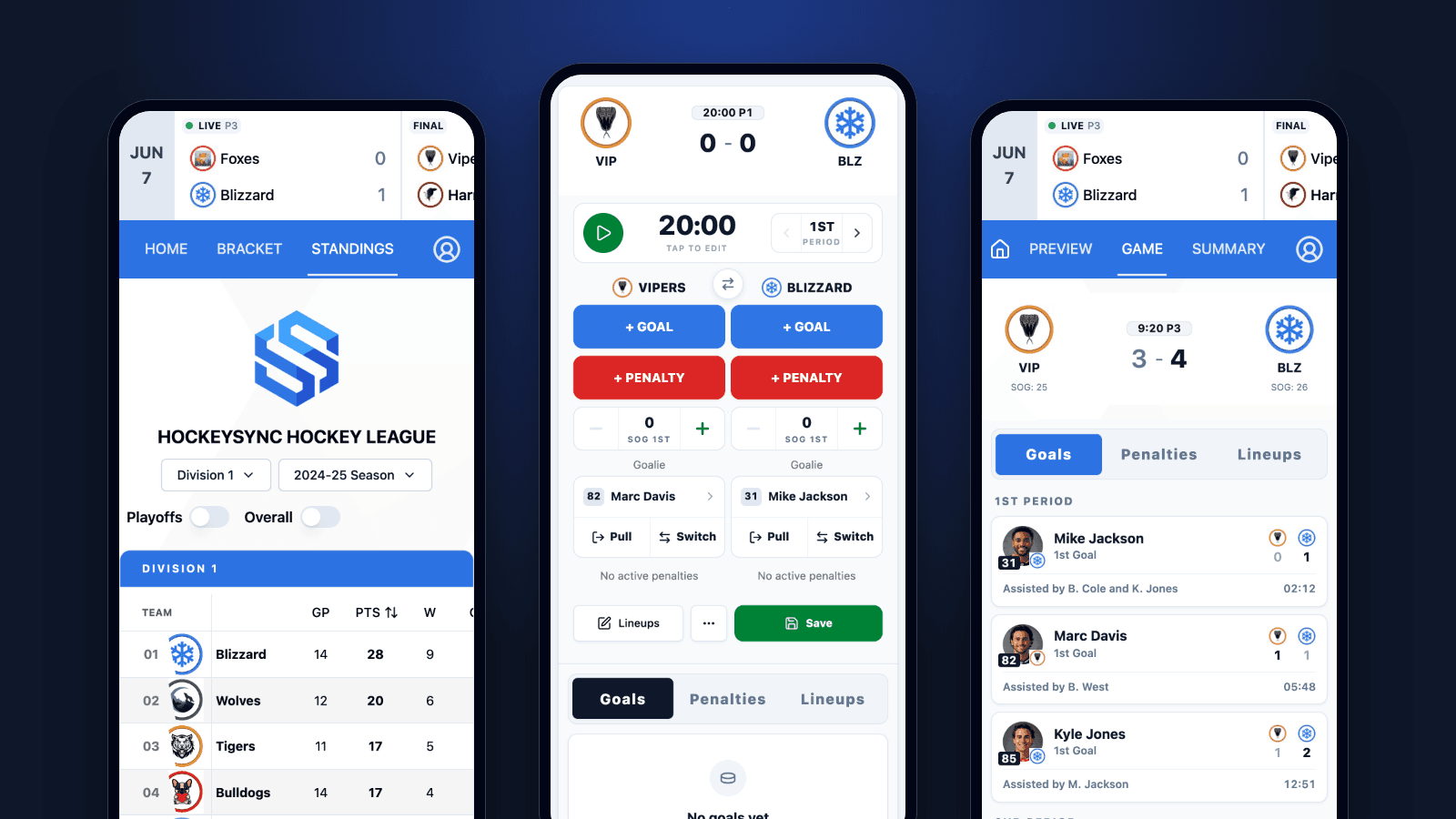
Second period, a one-goal game, and the scorekeeper at the timekeeper's bench looks down to log a penalty. The phone has dimmed itself. She unlocks it, finds the browser tab, waits for the page to wake up, and by the time the penalty is in there's been a whistle and a faceoff she didn't see. Up in the stands, a parent is pulling down to refresh a game link someone dropped in the team chat.
HockeySync is now an app, on the App Store for iPhone and iPad and on Google Play for Android. It's the same HockeySync your league already runs—same account, same leagues, same live scores—with the things a phone at a rink actually needs: a screen that stays on during a game, a tap you can feel when a goal is recorded, links that open in the app, and a clear warning when the arena's signal drops.
For the Scorekeeper
Live scoring is the screen the app exists for. Everything the scorekeeper does on a laptop at the scorer's table works from a phone in one hand: start the clock, record goals and assists, assess penalties, track shots and goalies, and save the game when the horn goes. Every event updates the scoreboard for everyone following the game as it happens.
What the app adds on top of the browser:
- The screen stays awake while the game is live. No more unlocking the phone between every whistle. When the game ends, the phone goes back to dimming normally.
- You can feel a goal go in. Recording a goal gives a haptic pulse and recording a penalty gives a different tap, so you can confirm an entry landed without taking your eyes off the ice.
- You're told when the connection drops. Walk into an arena basement and a bar appears across the bottom of the screen saying you're offline. Everything already on screen stays readable, and instead of a scoreboard that silently stops changing, you know why nothing is updating.
- No blank screen on launch. If the app opens with no connection at all, you get a proper offline screen with a way to retry, not an empty white page that looks like a crash.
Want to see it before your next game? The live scoring demo lets you score a practice game on your phone with no account and nothing saved.
For Players, Parents and Fans
Most people who open HockeySync never score a game. They want to know the score, when the next game is, and where their team sits. The app opens on a home screen built for exactly that:
- Find your league with a search box at the top. Type a few letters and you're there.
- My Leagues lists the leagues you're part of when you're signed in—the ones you help run, the ones where you follow a team, the ones where you're on a roster—plus any you've starred.
- Today's games shows what's on today, so game night starts with one tap.
From there it's your league the way it looks on the web: live scores that update while the game is being played, standings, the schedule, game previews and recaps with the goal log and three stars, player pages with career stats, and team pages. Live scores, standings, schedules and player pages don't need an account at all.
For League Admins
There's no cut-down “mobile version” to learn. The app is HockeySync, so every admin screen you use on a laptop is there on your phone—the schedule, rosters, lineups, standings settings, your association's dashboard. Upload a team logo or a player photo straight from your camera or photo library. A game you move on your laptop at the office shows up moved on your phone at the rink.
And because the app loads HockeySync live, new features reach the app the same day they reach the website. Most improvements don't wait for an app update or a store review.
Shared Links Open in the App
Game links get shared constantly—in the team group chat, in a league email, in a text from the coach. On iPhone, a link to a HockeySync page now opens in the app instead of in Safari, and it opens on the page that was shared: tap a link to last night's game and you land on that game. That includes links on your association's own web address, if it runs HockeySync on its own domain.
The few links that must stay in the browser still do. Password-reset and email verification links from your inbox open in the browser, the way they always have, so nobody gets locked out of their account.
Links leading out of HockeySync behave, too. On iPhone and Android alike, a sponsor's website or a waiver opened halfway through a registration form appears over the app in an in-app browser. Close it and you're back where you were, with the form still filled in.
Built for the Phone in Your Hand
A handful of details you'll only notice if they were missing:
- Swipe to go back. On iPhone, swipe in from the left edge to return to the previous screen, like any other app.
- The keyboard doesn't cover what you're typing. The screen shrinks to the space above the keyboard, so on a long registration form the field you tapped stays in view.
- Nothing hides under the notch. Headers and buttons stay clear of the Dynamic Island, the camera cutout and the home indicator.
- Google sign-in works the way it should. Continue with Google opens Google's own sign-in sheet from the system and drops you back in the app, signed in. Email and password work too.
- iPad included. The iOS app runs on iPad as well, which is a comfortable size at the scorer's table.
In English and Quebec French
The app speaks the same two languages HockeySync does. Switch to French and the whole app follows—in Quebec hockey French, with the terms a scorekeeper reads on a Hockey Québec gamesheet.
Already Using HockeySync in a Phone Browser?
If you open a league page in your phone's browser, HockeySync may offer you the app once—never on the first second of a shared link, only after you've looked at a second page or spent a little time on the first. It keeps that polite:
- Close it and it won't ask again for 60 days.
- Close it a second time and it won't ask again at all.
- Tap through to the store and it stops asking, whatever you decided there.
- Signed in and used the app recently? It won't ask you to install an app you already have.
It never appears inside the app itself.
Where to Find It
Search for HockeySync in the App Store or on Google Play, or use the links on this page. Sign in with the account you already use on hockeysync.com—email and password or Google—and your leagues are waiting on the home screen.
League admins: the fastest way to get your players on it is to share a link to your league. People who open it in a phone browser can be offered the app, and anyone who already has it on an iPhone lands straight in it.
Available Now
HockeySync is available now on the App Store for iPhone and iPad, and on Google Play for Android phones and tablets.
Not using HockeySync yet? Sign up free and run your next game from the bench.