A parent emails the league office: their son has two player pages. One says “Phil,” one says “Philip,” and his goals are split between them, so he isn't on the scoring leaders where he should be. The scorekeeper who couldn't find him on a Tuesday night simply typed him in again. Until now, the only way to clean that up was to delete one of the two—and his games went with it.
Associations collect duplicates in every direction: the same person registered twice, a roster imported twice, a club created again when it came back for another season. Merge Players and Merge Teams fold two records into one. Games, goals, assists, penalties and season totals all end up on the record you keep, and the duplicate disappears.
It Finds the Pairs for You
Both tools open on a list of likely duplicates, each pair tagged with the reason it was flagged. For players that is a matching name, a near-identical name, an abbreviated first name (“Phil” and “Philip,” the shape most gamesheet imports produce), or a shared date of birth. For teams it is a matching name, a matching abbreviation, a near-identical name, or the same name with a different suffix.
The list is a suggestion, not a verdict. Players are only compared with others who share their last name, so a misspelled surname won't show up there. For anything the list misses, pick the two records yourself: search for the record to keep on one side and the duplicate to merge on the other.
Review Before Anything Changes
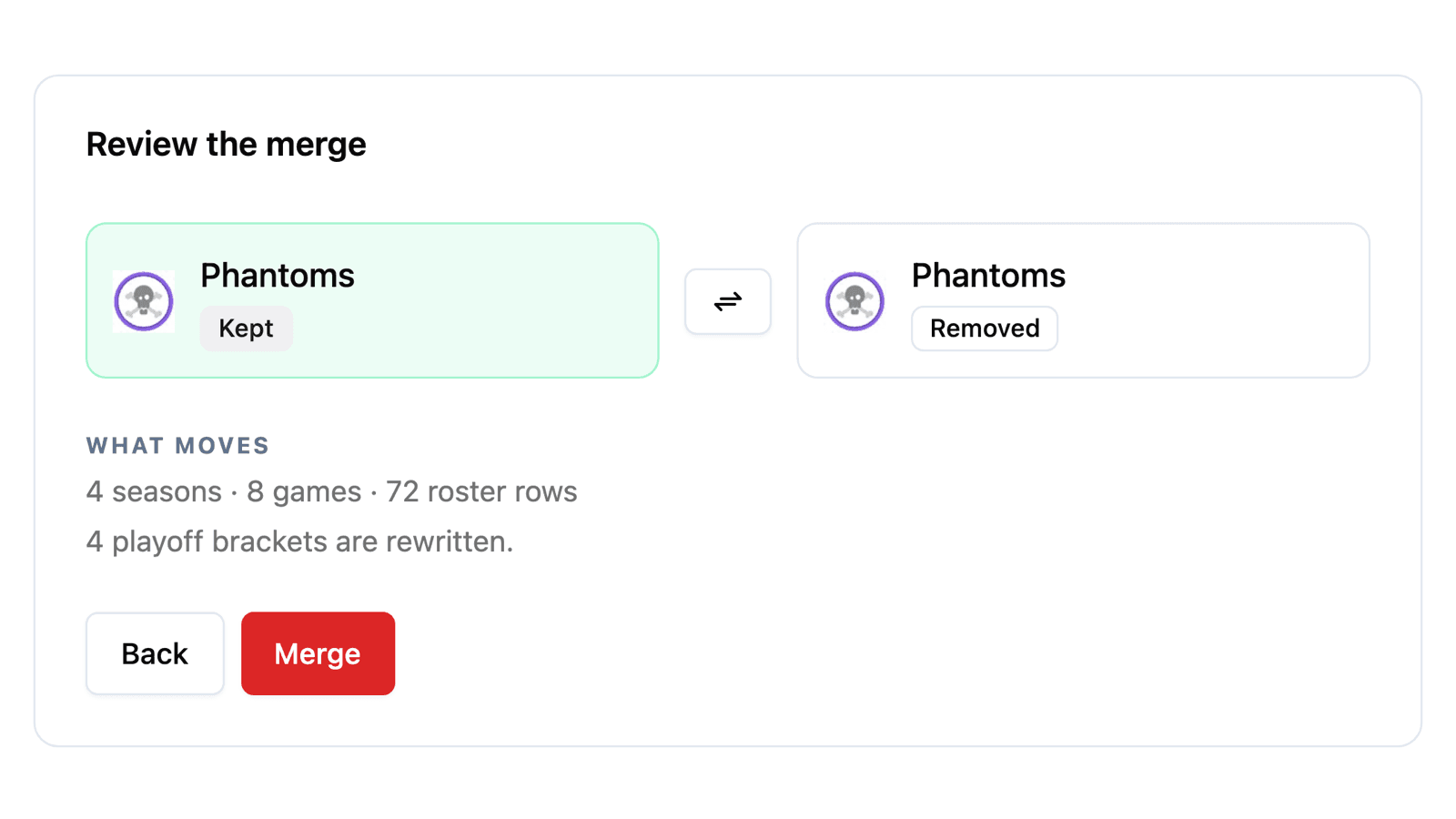
Choosing a pair opens a review screen. Nothing is written until you confirm.
- Kept and removed, side by side. One button swaps which record survives. The kept record keeps its own web address, so links people have shared keep working.
- Conflicting details. Where the two records disagree—two different photos, two birth dates, two team colours—you pick which value to keep, field by field. Where only the duplicate has something filled in, it is carried over on its own, so a date of birth that only lived on the spare isn't lost.
- What moves. A count of the seasons, games and scoring events changing hands, plus suspensions, transactions, playoff brackets and followers where there are any.
When Both Records Were on the Same Bench
The awkward case is a player who appears twice on one team in the same season. Both rows have games and points on them, and simply moving one onto the other would put the same person on the roster twice.
The review screen lists each of those seasons and asks what you want: Both adds the two rows together, Kept keeps only the kept record's numbers, and Duplicate keeps only the duplicate's. The games played, goals, assists and penalty minutes you'll end up with are shown as you switch, before you commit to anything.
Teams work the same way for a season both teams were entered in: add the two records together, or keep one side, with wins, losses, ties and goals shown for each choice. Players who were on both teams' rosters that season have their rows added together, since after the merge it is one team.
Old Game Sheets Follow Along
A merged player isn't just renamed in the stats tables. Past game sheets are updated too, so the lineups on games already played point at the kept record instead of a player who no longer exists. If both records were credited with an assist on the same goal, that collapses to a single assist rather than counting twice. When two teams merge, the playoff brackets that named the duplicate are rewritten to name the kept team.
Some Merges Are Refused
A few pairs can't be merged correctly, and the tool tells you when you pick them rather than after you've worked through the review:
- Either one is in a game being scored right now. Try again once the game is over.
- Two players linked to two different user accounts. Those are two different people.
- Two players in the same trade, or two teams that traded with each other. Fix the trade first.
- Two teams that have played each other. Merging them would leave a game with the same team on both sides.
There Is No Undo
Merging deletes the duplicate, and the confirmation says so in plain words before you press the red button. HockeySync logs every merge—who merged whom and what they chose—but there is no button to take one back. Take the extra second on the review screen.
Because it is destructive, merging needs permission to delete players or teams. Scorekeepers don't have it.
Where to Find It
Open your association dashboard and look under Tools, next to the Schedule Generator: Merge Players and Merge Teams. The likely duplicates are waiting when you open either one, and Scan again refreshes the list after you've merged a few.
Available Now
Both merge tools are live for every HockeySync association, in English and in French. If your leaderboards have two of anybody, now is a good time to open them.
Not using HockeySync yet? Sign up free and keep one record per player from the start.