Sunday night, the weekend's games are in, and the commissioner opens the spreadsheet. Plus $400,000 for every player on a team that won. Minus $200,000 for every player on a team that lost. A few thousand more for each goal and assist. Then down the adjustment column by hand, pulling back up to zero the players who went below it. By the time the totals are right, somebody has already texted to ask whether their team is over the cap.
The salary cap add-on does that work from the games themselves. A league sets what a win, a tie, a loss, a goal and an assist are worth. From then on, every saved game moves every contract, each team is drawn against the cap, and every player's salary opens to the list of entries that produced it.
A Player Is Worth What His Team Does
Every contract starts at the league's base player salary. An admin can give any player a different starting figure right in the contracts table; leave the box empty and the player follows the base salary.
From there, the league's rates take over:
- Win, tie and loss. Every player on the roster gets the result, because a result belongs to the team. Rates can be negative, so a loss can cost money as well as earn less.
- Goals and assists. Priced per point, on top of the result.
- Penalty minutes. Available for a league that wants discipline to cost something, and worth $0 until you set it.
Only saved games count, since a saved game is one with stats behind it. Playoff games count only if the league switches on Count playoff games. Players marked as subs stay out of the team totals, so a team isn't charged for somebody it doesn't employ.
Trades are handled too. A player traded halfway through the season is paid for his old team's results up to the trade and his new team's after it. His contract counts against the team he's on now, and the salary-over-time chart carries it on his old team until the day he left.
Goalies Get Their Own Rates
A goalie isn't going to earn much from a goal rate, so a league that wants goalie salaries to move has to price their games separately. The rates are split into a Player block and a Goalie block, and the Goalie block has its own win, tie and loss, plus a shutout, which only a goalie can earn.
Goals and assists aren't repeated there. A goalie who picks up an assist is paid the same as anyone else for it. And a goalie with no rates set stays at his starting salary instead of quietly borrowing the skater numbers.
A Floor and a Ceiling
Under Player salary limits, a league can set the lowest and the highest any one contract can go. A floor of zero means a salary can't go negative. Leave either box blank and that side has no limit.
The limit isn't hidden. When a player's season would take him past the floor or the ceiling, the correction is written into his ledger as its own line, and his row in the contracts table gets a FLOOR or MAX badge. The row that doesn't add up says why.
Every Team Against the Cap
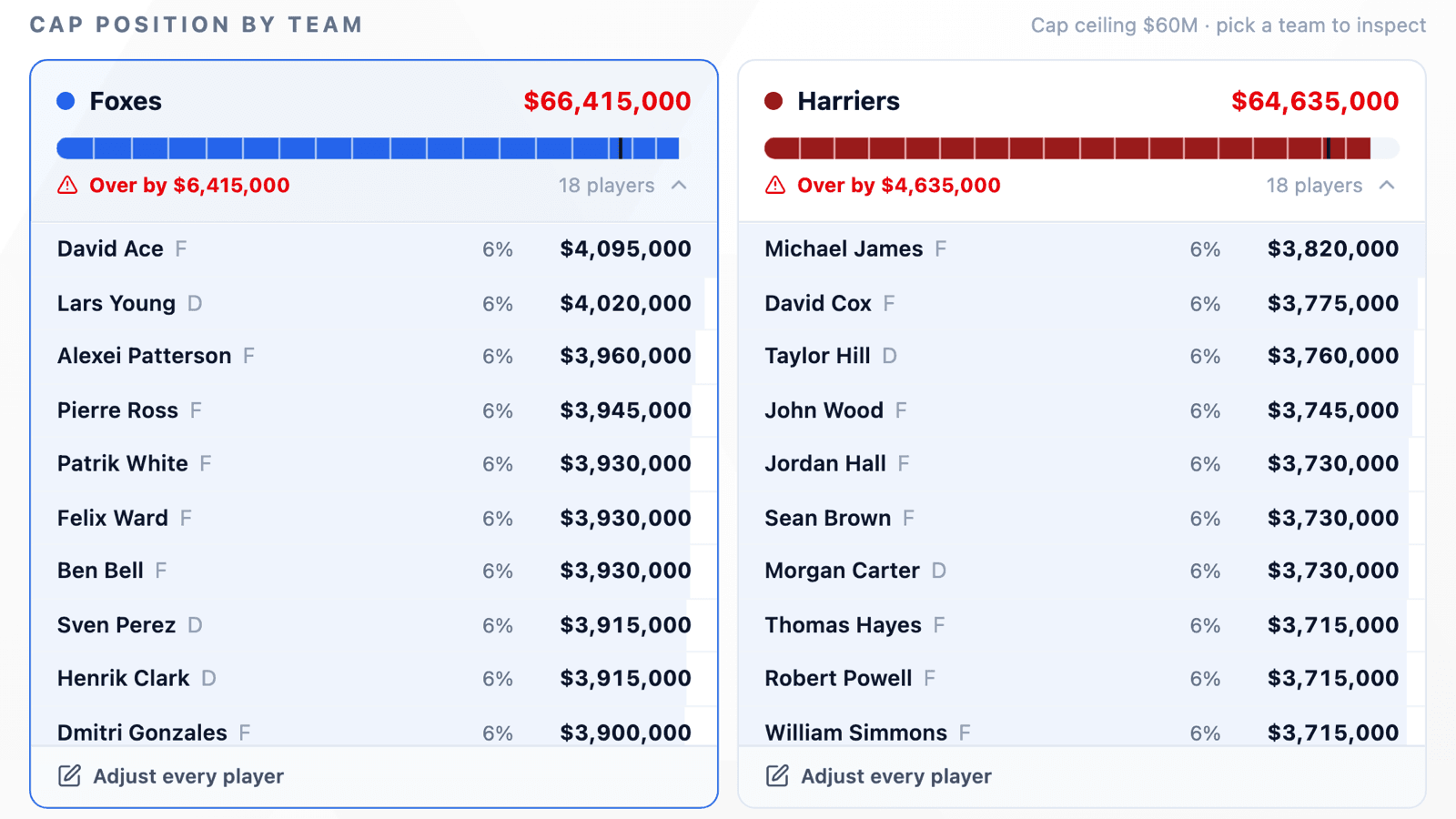
The top of the page is Cap position by team: one card per team with its committed salary, a bar in the team's own colour, and the cap marked across it. A team under the cap shows how much space it has left. A team over it turns red and shows how far over it is. The bar isn't cut off at the cap line, so you can see how far past it a team has gone.
Click a team to open its roster in place: every contract, largest first, with its share of that team's total. The same click narrows the contracts table to that team and fades the other lines on the chart, so the question “why is this team over?” gets answered from one place.
Below the cards, Salary over time charts every team's total across the season against a dashed cap line, with one point per game day in the league's own timezone. Click a team in the legend to pick it out.
Every Contract, and the Ledger Behind It
The contracts table lists every player in the league with his team's crest, games played, record, goals and assists, then the columns that make up his salary: starting salary, game results, production, manual adjustments, and the current figure. Left to right, they add up. Search by name, or sort by team, salary, games or production.
Click a player and his ledger opens: every entry in date order, with the amount and the running balance after it. Starting salary, then each win or loss, then each night's goals and assists. When a player asks why he's worth what he's worth, you can show him line by line.
Adjustments Keep Their History
Commissioners fine players and pay out bonuses. At the bottom of the ledger, an admin enters an amount and a reason and adds it. The adjustment lands in the ledger on the day it was made, with the reason shown under it.
Adjustments add up rather than replace each other. A +$100,000 in January and a −$50,000 in March are two lines, not one number where March overwrote January. Each one can be removed on its own. When a player has more than one, the adjustment column shows a count next to the total. An empty amount or a zero isn't accepted.
Adjust a Whole Team at Once
Some decisions are about a whole bench, like fining a team for a forfeit. Entering that eighteen times is how one player gets missed and another gets it twice. Open a team's card and choose Adjust every player: one amount, one reason, applied to the whole roster.
What it writes is an ordinary adjustment in each player's ledger, all with the same reason. If one player shouldn't have been included, remove his line and leave the rest. Subs are left out, the same as in the cap totals.
Where to Find It
The salary cap is an add-on, off by default. A league admin turns it on in the league's Settings tab under Add-ons, with Enable salary cap. Salary Cap then appears in the league's More menu.
On the page, Configure cap opens the numbers: team salary cap, base player salary, the Player and Goalie rates, the salary limits, and whether playoff games count. The rules are stored per season, so changing what a win is worth this season doesn't change what last season's contracts were worth. Anyone can read the page. Only league admins can edit it.
Trades are an add-on too, turned on from the same Add-ons section. If your league runs a cap, it probably trades, and the trade workflow is how a team over the cap gets back under it.
Available Now
The salary cap is available to every HockeySync league, in English and in French. Switch it on, set your numbers, and the season's saved games are priced straight away.
Not using HockeySync yet? Sign up free and put the spreadsheet away.